I’ve been using Claude Duet as my chief of staff. It reads my email, watches my calendar, drafts my replies and tells me what needs me. It’s good at the job. The bottleneck is me, and the chat box I’m stuck answering it through.
Here’s a typical morning. Duet says five things need my OK: an update to a marketing campaign, an intro call, an investor update, a 1:1 to move, a subscription to renew. Reply with approve, edit or skip for each. So I scroll up, hold five items in my head, and type something like “1 approve, 2 skip, 3 approve, 4 edit, 5 approve. also remind me to call Anna.”
That’s not delegation. That’s data entry.
Why it matters: Chat is a mail slot. Everything comes through it single file, and everything goes back out the same way, in typed sentences. A real chief of staff puts a folder on your desk, you scribble on it, and they take it away.
The idea
Give your AI a desk. Claude Canvas is an iPad and Apple Pencil canvas that Duet can draw on. Duet stays in the chat app and stays the brain. The canvas is where it puts the work: a sheet of approvals, an agenda, a draft to mark up. You answer the way you’d answer paper. Circle, tick, strike, scribble.
I didn’t want to rebuild Duet. I wanted to plug into it. So the canvas is just a connector, one URL in Duet’s connector settings. Duet gets a handful of new tools: look at the canvas, show a template, show a page, annotate, move the view. Everything it already knows about my email and calendar stays where it is.
The same connector works from Claude chat and Claude Code too. Any Claude that can take a connector can take a desk.
The canvas and the Pencil strokes are real; the chat is illustrative. Names are fictional.
How it works
Say “put it on my iPad” and Duet picks a template, fills it with your real stuff and drops it on the canvas. Then you do what you’d do with paper.
One sheet, everything at once. All five approvals sit on one page. Circle Approve, Edit or Skip on each row in a single pass with the Pencil. No scrolling, no remembering which number was the deposit.
The tray. Every page has a little “Hand to Duet” box at the bottom. Scribble call Anna in it. The canvas crops your handwriting, a model on my Mac reads it, and Duet gets the words.
Redline like paper. Strike a sentence in a draft and Duet gets the exact words under your line, not a vague “something in paragraph two.” It sends back the clean version.
Two keys. A circle is intent, not permission. When I say “check my iPad,” Duet lists everything I marked and asks once in chat: shall I go ahead with the three approvals? Nothing gets sent, paid or booked until I type yes.
An operating manual we write together. There’s a worksheet of house rules: approvals, calendar, writing voice, check-ins. Duet proposes rules, I tick, cross out and scribble new ones (my first was NO CALLS), and Duet saves it. Every new conversation starts by reading it.
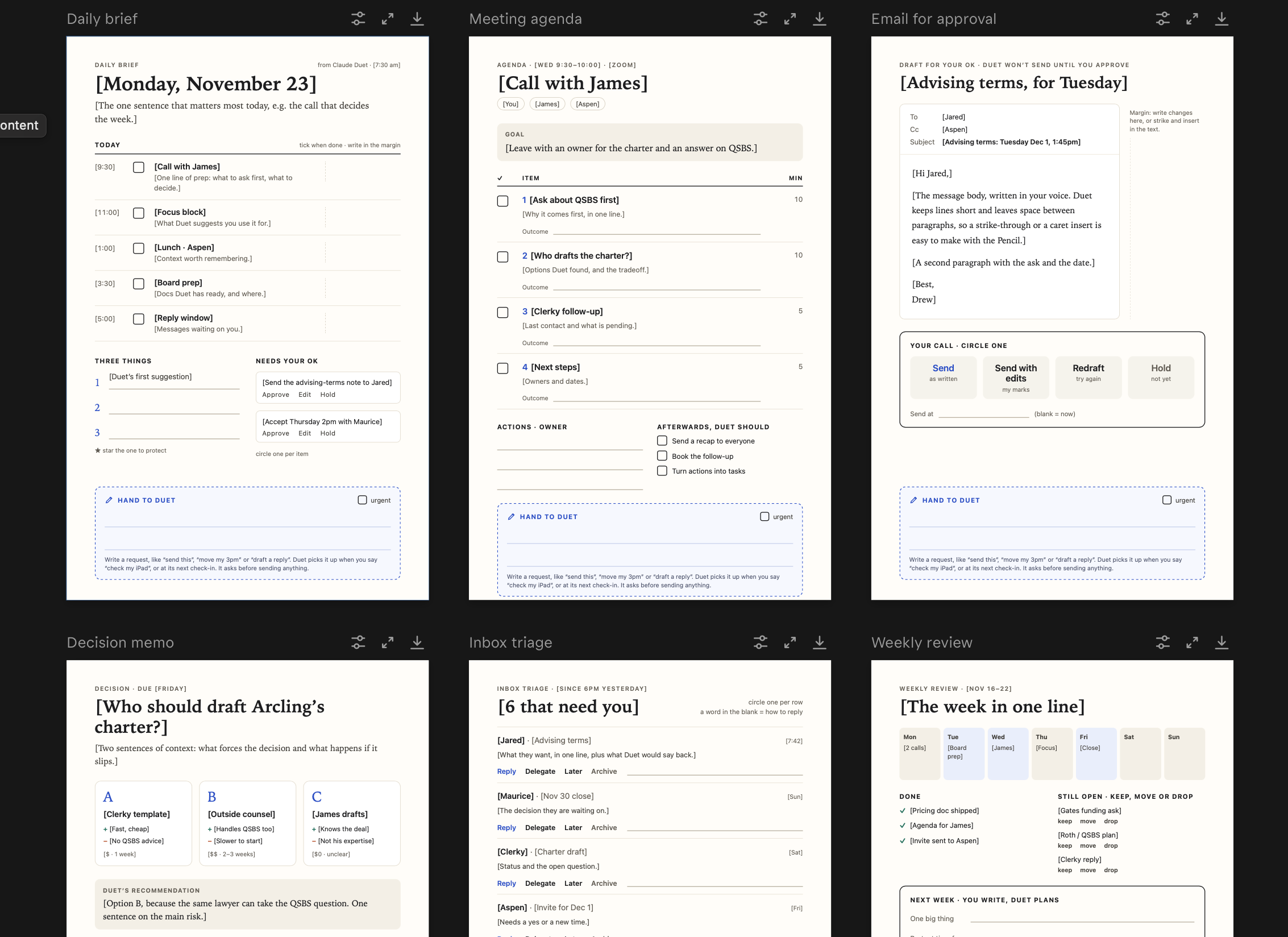
New sheets on the fly. Eleven templates ship with it: daily brief, agenda, decision memo, inbox triage, weekly review and more. When none fits, Duet designs a page from the same kit, like a trip planner where I circle a hotel and a train.
Five decisions went from one long typed message to five flicks of the wrist.
Also Safety. It runs on my laptop, so it gets canvas powers only. No shell, no files. It sits behind a passcode on a private network. The approval rule is hard-coded, so even my own operating manual can’t talk Duet out of asking first. The code for Claude Canvas is open, MIT licensed, on GitHub if you want to try it yourself.
The catch
It’s a hack. It runs on my laptop, the iPad is just a browser tab, and the tldraw SDK needs a license before anyone ships it for real. Three questions I can’t answer yet:
Should the canvas live inside the Claude app? A connector proves the idea. A native canvas would make it disappear into the product.
What’s the right grammar of marks? Circle, tick and strike are obvious. Arrows, stars and “??” in the margin are not yet.
Who else sits at the desk? A shared canvas with an assistant, a co-founder and a lawyer marking up the same page sounds like a real meeting.
The code is open, MIT licensed, on GitHub.
The bottom line: we gave our assistants hands, eyes and a calendar, then made them talk to us through a mail slot. Give them a desk.
Anthropic, please steal this idea.